To play




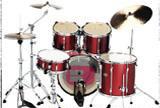
Virtual Drums puts a complete drum kit at your fingertips — no setup required, no neighbors to annoy, just rhythm waiting to happen. This classic browser music game hands you a full percussion setup and lets you play exactly how you want, whether that means working out a beat you heard on the radio or inventing something entirely your own.
How to Play
Each part of the drum kit is mapped to a key on your keyboard — numbers 0, 1, 2, 3, 4, 5, 6, 7, and 9 — with the mouse available for clicking directly on drum and cymbal elements on screen. Strike the keys to hit the corresponding drum, layer sounds together, and build up patterns from scratch. There are no points to chase, no timer to beat, and no wrong way to approach the kit.
The best starting point is learning which key corresponds to which drum before trying to play anything. A few seconds of deliberate testing — one key at a time — pays off immediately when you start combining sounds into actual rhythms.
More Than a Toy — A Real Rhythm Tool
Virtual Drums lives in the Music section under Children's games, but the experience reaches well past that label. Drummers use virtual kits for practice when a physical set isn't accessible; producers use them to sketch out rhythmic ideas; and curious players of all ages use them simply because drumming is satisfying in a way that's hard to explain until you've tried it.
Rhythm is foundational to music, and getting hands-on with percussion — even through a keyboard — sharpens your ear and timing in ways that passive listening can't. The feedback is immediate: you hit the key, you hear the drum, you feel whether the beat landed where you wanted it to. That loop is what makes drumming so compelling.
Tips for Finding Your Groove
Start with the simplest pattern that feels musical: kick drum on every beat, snare on beats two and four. Once that's flowing without effort, bring in the hi-hat to fill the space between. Building up from a solid foundation rather than throwing everything at the kit at once is what separates a groove from chaos.
Use the mouse to handle cymbals when your keyboard fingers are busy. Mixing input methods gives you access to more of the kit simultaneously and opens up rhythmic combinations that a keyboard-only approach would make awkward. Experiment with lighter and heavier hits for dynamics — variation in intensity is what gives a beat human feel rather than robotic repetition.
Why Virtual Drumming Is Worth the Time
There's a particular pull to percussion that other instruments don't quite replicate: you feel the rhythm as much as you hear it. Virtual Drums brings a version of that experience to the browser and makes it accessible to anyone who wants to explore it. Hours can disappear while you're chasing the right beat or trying to reproduce something you heard in a song.
If music games are your thing, Gorillaz Groove Session and Gorillaz Escape to Plastic Beach offer related experiences in the same Music category. But if the idea of sitting down at a kit and playing until the rhythm takes over sounds like your kind of afternoon, Virtual Drums is ready when you are.
Sit down, find your tempo, and see what you can make.
Controls :
012345679RATON